Scan to play on mobile
Dress Up Anime Girl
How to Play
Game Overview
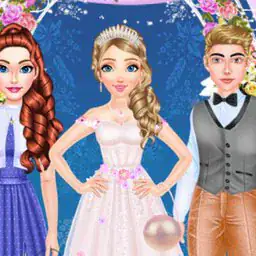
So I spent way too long on this dress-up game, and honestly, it's exactly what it sounds like--you pick an anime girl and mess with her look. There's a princess theme going on, but the vibe is more about throwing together wild outfits than staying historically accurate. The graphics stick to that classic anime style, big eyes and all, which works fine for what it is. What got me hooked is the sheer number of combinations--over ten million, apparently, and I believe it because I kept hitting the random button and seeing something new each time. There are some weird items tucked in there, like a cat ear headband or a space-themed dress, which breaks up the usual frilly princess stuff. Oh, and there are actual cute cats you can add to the scene, which is a nice touch. The screenshot button is handy if you want to save your creation, but the game itself is pretty simple to navigate. You just drag and drop clothes, hairstyles, and makeup until it looks right. It feels like one of those browser games you'd kill time with on a lazy afternoon. My younger cousin got obsessed with it for a whole weekend, and I can see anyone who likes fashion or anime or just messing around with character creators getting into it too. It's not deep--there's no story or levels--but that's kind of the point. It's just a chill, creative sandbox where you can make something silly or pretty and move on.
About Dress Up Anime Girl
So, you open Dress Up Anime Girl and there's this princess waiting. She's got a default look--some plain dress, basic hair, no makeup. Your job is to fix that. The whole game is basically a giant dress-up closet with a random button that might surprise you. You start by picking a category: outfits, hairstyles, makeup, accessories, or backgrounds. Each category has a ton of options, and they're all drawn in that cute anime style. The loop is simple: click through items, see how they look on her, mix and match. The satisfying moment is when you find a combo that just clicks--like a pink kimono with cat ears and a matching hair bow. The game doesn't have levels or enemies, so don't expect any action. But there's a screenshot button, and that's the real goal: make a cool avatar you can save. The backgrounds are worth mentioning--they change the whole vibe, from a cherry blossom garden to a starry night. There's also a random button that's surprisingly useful; sometimes it throws together a weird but awesome look you'd never try. The 10 million combinations claim is real because there are hair colors, eye colors, and even little blush options. Cats show up as accessories or background elements, and they're cute. Difficulty? None. It's all about patience and taste. You might spend five minutes or an hour just scrolling through skirts and tops. The game doesn't punish you, so there's no fail state. What keeps it interesting is the sheer variety--there are gothic dresses, school uniforms, casual jeans, and even a witch hat. Makeup includes lipstick shades and eye shadows, which can totally change the princess's expression. The screenshot button is key; you can save your favorite designs and use them as social media avatars. Some items are hidden in the sense that you have to scroll past a lot to find them, like the ninja suit or the halo. The random button is great for breaking out of a rut. One time I hit it and got a cyberpunk look with neon hair and a holographic dress, which I never would have thought of. The game doesn't have upgrades or progression, so the only reward is your own satisfaction. You can also change the background to match your outfit, which helps with the screenshot. The princess stands still and rotates a little when you click, so you see front and back. It's not deep, but it's relaxing. The cats are just there to be cute, and they are.
Tips & Tricks
The random button is your best friend when you're stuck in a rut--just keep hitting it until something clicks, then tweak from there. I spent way too long manually picking each item before realizing that. Cats are hidden in the accessories section, not the pets menu, so scroll all the way down to find the fluffy ones that sit on the princess's shoulder. Screenshot button saves to your device automatically, but it also works while you're still editing--hit it mid-dress to catch a funny pose. Layering hair with hats is tricky; some hats clip through longer hairstyles, so test the combo before finalizing. Makeup changes are subtle but matter a lot--eyebrow color can clash with hair dye if you aren't careful. The game crashes if you try to stack too many items at once, so save your favorite combos by screenshotting them early. That one rare dress with the star pattern? It only shows up after you've cycled through about fifty random outfits, so patience pays off. Also, the color wheel for eyes and skin is more sensitive than it looks--small adjustments give way different results than you'd expect.





















Comments
Please login to leave a comment.