Scan to play on mobile
Tappy Tower
How to Play
Game Overview
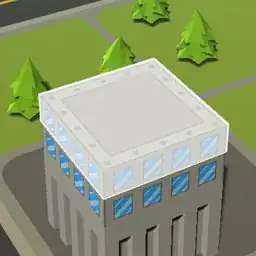
So Tappy Tower is this little mobile game where you just tap to stack blocks on top of each other. You're building a tower by placing floors, and the catch is that if you miss the center just a tiny bit, the whole thing starts wobbling and then falls apart. The visual style is super clean -- like minimalist white and pastel colors, with these satisfying little animations when you get a perfect placement. The tower sways as it gets taller, which actually makes you feel like it's unstable, and that tension is real. The sound is just these crisp clicks and a crash when it topples. I've played it for way longer than I expected because there's this rhythm to it where you get in a zone, tapping at the right moment, and then one mess-up and you're starting over. It's not deep or complicated at all, but that's the point. People who like games where you try to beat your own high score will get hooked. It's perfect for killing time on a bus or when you're waiting for something. The difficulty ramps up because the blocks get smaller as you go higher, so the margin for error shrinks. My highest tower is like 45 floors, and I swear my heart was pounding by the end. It's honestly more addictive than it has any right to be, and the minimalist design keeps it from being overwhelming.
About Tappy Tower
So Tappy Tower. You tap the screen to drop a floor piece onto the stack below it. That's the whole basic loop. Each new floor slides left and right, and you time your tap to line it up with the one beneath. Get it perfect and the piece snaps into place with a satisfying thunk. Miss by even a pixel and the overhang gets trimmed off -- that part falls away, and now your tower is narrower. That's the real tension. Your tower gets skinnier and skinnier with every mistake, making the next placement even harder. You're not just building up, you're fighting your own shaky hands and the shrinking platform.
The first few levels are easy. You get wide floors and slow slides. But around level 5, things change. The speed picks up. By level 10, the floors start moving in a figure-eight pattern instead of a straight line, which messes with your timing entirely. The game calls these "Sway Stages." There's also a mechanic called "Crack Points" -- if you misalign too badly, you see small cracks appear on the tower. Three cracks and it's game over, which is annoying because sometimes one bad tap feels unfair. But it forces you to be careful.
Later levels introduce "Wobble Zones" where the whole tower sways left and right while you're trying to place a floor. That's when your brain really has to work -- you're tracking two moving things at once. There's also "Gold Floors" that appear randomly. Sliding a perfect placement on a Gold Floor gives you a multiplier for the next five floors, which is huge for high scores. The satisfying moment comes when you chain five Gold Floors in a row and the tower just grows impossibly tall with a golden shimmer.
Upgrades come between runs. You can buy "Stabilizers" that reduce wobble for three floors, or "Perfect Grip" that gives you a slightly larger perfect zone. There's also an upgrade called "Slow Mo" that activates automatically when you're about to misalign badly -- it slows the slide for a split second. Costs a lot of gems, but it's saved my runs more than once.
The objectives are simple at first: reach level 20 to unlock the next world. But then you get secondary goals like "place 100 perfects in one run" or "build a tower with 0 cracks." The game keeps a running counter of your best tower height and your perfect streak. The high score chase is real. Some levels have names like "Shaky Start" and "The Gauntlet" and "Precision's End." The final world is called "The Void" and the floors are almost invisible against the background, which feels cruel.
You tap fast when you're confident, slow when you're nervous. The game knows when you hesitate. And that one time you nail a perfect on a Wobble Zone at level 45 -- that's the moment you keep coming back for. The loop is just tap, align, watch the piece fall, repeat. But the tension keeps it fresh.
Tips & Tricks
The biggest thing that messed me up early was rushing the tap timing. The game''s alignment check is actually pretty generous at the start, but as the tower gets taller, the wobble animation speeds up. You want to watch the new floor slide into place, not just react to the visual of it passing over the old one. I lost a 50-floor run because I tapped half a second too soon.
Another trick is to let the floor slide almost to the very edge of the previous block. Even if it hangs off by a pixel, it''ll still count if the center lines up. That''s my go-to for those high-pressure placements where you''re sweating.
Don''t bother trying to perfectly center every floor in the first 20 levels -- the game doesn''t punish small mistakes until later. Save your focus for when the tower starts swaying visibly.
I also found that holding your finger on the screen briefly before tapping helps stabilize your hand. It''s not mentioned anywhere, but it reduces those jerky mis-taps.
Oh, and the camera angle shifts subtly as you climb. After floor 30, the tower looks taller and your perspective changes, which can throw off depth perception. I started tapping earlier than I thought I needed to once I hit that zone.
One mistake I kept making was trying to align by looking at the left edge of the floor. Instead, focus on the center line of the previous block -- it''s way easier to match that way.











Comments
Please login to leave a comment.